Home > Blogs > Test Automation > Improving Test Automation: Migrating from Selenium to Playwright

March 20, 2025

Table of Contents
Web Applications are getting complex with the growing technology and client’s needs; to achieve better performance, scalability and reliability we need to develop and utilize more efficient automation tools and frameworks. For years, Selenium was the major framework to create and test the web application and later new frameworks like Playwright was introduced to get more performance, ease of use, reliability and support of many browsers. In this article, we will discuss and showcase how we migrated Selenium based automation testing to Playwright, we will also discuss planning, process, technical implementation, challenges and benefits of the migration.
Automated testing is a key part of contemporary software development, with quicker releases and better software quality. Although Selenium is popular, it has issues with flaky tests, slower running, and weak support for current web technologies.
In an ever-evolving software development lifecycle, we need to keep a check on new frameworks and technologies in order to be more efficient and more rigorous automation testing. We were using Selenium based automation for years for our current test automation and environment. But we identified some issues like:
- Flakiness in tests: Selenium tests were flaky because of timing-related issues and browser-specific behavior.
- Limited support for contemporary web features: Selenium had difficulty with dealing with sophisticated web features such as network interception, geolocation, and multi-tab interactions.
- Maintenance overhead: It took a lot of effort to write and maintain Selenium tests, particularly with cross-browser testing.
- Performance bottlenecks: Selenium tests were slower than newer tools, affecting our CI/CD pipeline efficiency.
key Objectives/ Deliverables
The focus and objective of this migration from Selenium to Playwright was to enhance reliability, performance, and efficiency. Our major deliverables were:
- Smooth migration: Migration from Selenium to Playwright with zero disruption to current tests.
- Better test stability: Minimize flakiness and increase test reliability across browsers.
- Enhance functionality: Playwright’s advanced features such as network mocking, auto-waiting, and multi-browser support.
- Improved execution: Streamline test execution time to speed up CI/CD pipelines.
- Scalable architecture: Create a future-proof structure that is easily extendable to incorporate new features and tests.
The Planning / MigratoinApproach
For a smoother and seamless migration, our approach was to break into phases:
Phase 1: Research and Analysis
After analysis and research, a suite of Azure technologies was identified to meet the specific needs of the project:
- We performed an exhaustive comparison of Selenium and Playwright to know the difference and advantages of both tools.
- Recognized important features of Playwright that could solve our pain points (e.g., auto-waiting, built-in assertions, and browser context isolation).
- Emphasizing Playwright’s auto-waiting feature and cross-browser support as our primary differentiators.
Phase 2: Creating Proof of Concept
- Developed a minimal PoC to check the capabilities of Playwright and its compatibility with our current framework.
- Emphasized major test scenarios to determine performance, stability, and simplicity of implementation.
- Emphasized network interception and multi-tab management in our PoC to verify the capabilities of advanced features of Playwright.
Phase 3: Incremental Migration
- Favored high-impact test suites for migration in order to limit risks.
- Created a side-by-side testing scenario where Selenium tests and Playwright tests could both be executed side by side throughout the transition period.
- Migrated tests in batches and tested them extensively before switching to the next batch.
Phase 4: Full Adoption
- Migrated the rest of the test cases step by step into Playwright.
- Retired the Selenium framework once all the tests were successfully transferred and tested.
Migration Phases
The migration phase was systematically divided into several key steps:
We began by installing Playwright via npm:

This command created the required dependencies and a minimal project structure.
Playwright’s syntax is clean and developer-friendly. Here’s a sample test case in Playwright:

We used Playwright’s powerful features, including network interception:

Playwright’s native parallel execution support greatly minimized test execution time:

Overall Solution
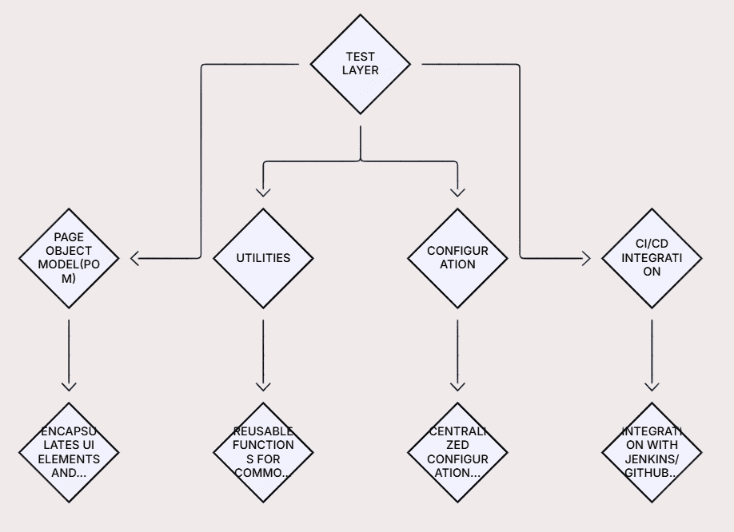
The new framework architecture is modular and scalable:
- Test Layer: Holds all test scripts in Playwright.
- Page Object Model (POM): Wraps up UI elements and actions for ease of maintenance.
- Utilities: Has reusable methods for generic work such as data generation and API calls.
- Configuration: Having centralized configuration files for environment properties.
- CI/CD Integration: Easy integration with Jenkins/GitHub Actions for automated runs.
Challenges & Resolutions
Challenge: Learning Curve
Resolution: Had training sessions and generated detailed documentation so that the team could catch up on Playwright.
Challenge: Handling Dynamic Content
Resolution: Utilized Playwright’s auto-waiting feature to manage dynamic elements efficiently.
Challenge: Cross-Browser Testing
Resolution: Used Playwright’s native support for multiple browsers (Chromium, Firefox, WebKit) to guarantee consistent behavior.
Challenge: Test Data Management
Resolution: Used a centralized test data management system to simplify data handling across tests.
Key Takeaways
- Playwright is a game-changer: Its contemporary features and simplicity make it a better choice than Selenium.
- Incremental migration is the way to go: Phased migration reduces risk and provides a seamless transition.
- Invest in training: Proper training of the team is the key to successful adoption.
- Learn from others: Lessons learned from other successful migrations were valuable for lessons and best practices.
Benefits
- Better test stability: Less flakiness, more reliability.
- Faster execution: Optimizations in Playwright’s performance made tests run faster.
- Increased functionality: Advanced features such as network mocking and support for multi-tabs opened up new avenues for testing.
- Enhanced developer experience: Playwright’s simple API and debugging features simplified test development and execution.
This Migration from Selenium to Playwright provides significant benefits in automation test performance, reliability, and scalability. Organizations can create more efficient and simplified automation tests using robust and enhanced features of Playwright to deliver web applications faster. The continuous improvements in Playwright’s ecosystem, selecting this testing framework will guarantee a future-proof and reliable automation strategy.
Contributor
Bhanu Prasad M
Test Lead
 Websites used to be something you built once and basically forgot about. That doesn’t work …Read More »
- Learn how to plan an Optimizely CMS 13 upgrade with .NET 10, Optimizely Graph, Visual …Read More »
- Learn how AI meeting notes automate summaries, action items, and insights from video meetings using …Read More »