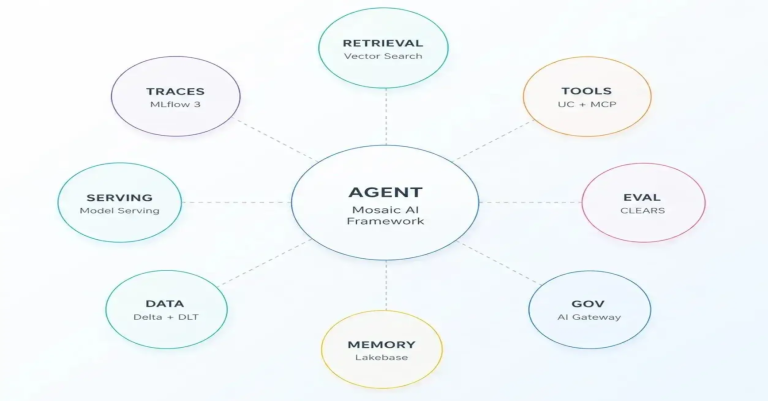
AWS Databricks vs. Azure Databricks

AWS Databricks vs. Azure Databricks: Deployment Best Practices for Modern Data Analytics
Haider-Jan-webp
Haider Jan

Data Engineer

May 23, 2025

Playwright & Selenium Automation Testing Predictions for 2025 and Beyond

With the shift to digital transformation, organizations are using their data to strengthen innovation, satisfy customers, and choose better business paths. Thus, this blog explores AWS Databricks vs Azure Databricks, diving deep into their differences, deployment strategies, and best practices to help you harness the full potential of Databricks for your data analytics needs.

Using Databricks and similar tools is more crucial than before because businesses manage so much data today. Databricks on either AWS or Azure will shape its functioning, quick growth, proficiency, and how much you can get done with it.

What Is Databricks, A Quick Look?

Databricks connects the workflow for data engineering, machine learning, and collaborative data science into one place. Thanks to Apache Spark, this system is easy to use to work with large sets of data. Organizations use databricks to handle data, analyze it immediately, and launch AI and machine learning models.  

When choosing between Databricks AWS vs Azure, businesses must consider their existing cloud infrastructure, team expertise, compliance requirements, and integration needs.  

Royal Cyber, the best Databricks partners in the USA, offers expert guidance and solutions tailored to meet your data transformation needs. As a leading technology consultant, we help businesses across the USA unlock the full potential of Databricks for seamless integration and scalable growth.

Would you like to sign up for Databricks Lakehouse Training? Click here!

AWS Databricks vs Azure Databricks: Key Differences

While Databricks maintains consistency across platforms, there are nuanced differences between AWS Databricks vs Azure Databricks that influence deployment and operation:   

1. Integration and Ecosystem

You can easily use Azure Databricks with other Azure services, including Data Lake Storage (ADLS), Synapse, DevOps, and Machine Learning (Azure ML). It is available from Microsoft itself and enables better integration between itself and Azure Active Directory (AAD).   

AWS Databricks pairs well with AWS services such as S3, Redshift, and SageMaker. Being part of AWS Marketplace, it does not offer direct integration like Azure services.   

2. Deployment and Management

Deployments in Azure Databricks are made easier using the Azure Portal and ARM templates. It supports “azure databricks deploy model” pipelines using Azure ML and DevOps.   

AWS Databricks offers flexibility in deployment using CloudFormation templates, Terraform, and the AWS CLI. It is possible to handle deployment pipelines by using SageMaker and CodePipeline.   

3. Pricing and Billing

Azure Databricks bills you for workload costs right through your Azure subscription. AWS Databricks billing goes through the AWS Marketplace, which may introduce complexity for cost forecasting and management.   

4. Security and Compliance

Microsoft’s compliance policies cover Azure with FedRAMP, HIPAA, and GDPR. AWS security is solid, but companies need to customize IAM policies by hand on some occasions.   

Deployment Best Practices: Azure Databricks Deploy Model

Following best practices makes models used in Azure Databricks perform better, remain reproducible, and be secure. This is how Royal Cyber supports the rollout of models on Azure:   

1. Use MLflow for Model Tracking

Within Databricks, MLflow is an important tool for managing all the various stages of an ML project. To make sure you can use or reuse your models, track them in MLflow.   

2. Leverage Azure DevOps for CI/CD

Build your open-source pipelines using Azure DevOps. Because of this, models can be continually updated and deployed, monitored, and fixed when necessary.   

3. Secure the Interfaces to Models

Access to the results of models can be managed using Azure Active Directory. Use OAuth tokens and RBAC to secure your APIs.   

4. Optimize Clusters

Design your clusters depending on what type of work is being performed. Make sure to use these tools to control expenses better.   

Deployment Best Practices: AWS Databricks

Deploying models in AWS Databricks involves similar principles with AWS-specific tools:   

1. Utilize SageMaker for Model Deployment

While Databricks is capable of serving native ML models, you have the option to upload your models to SageMaker for larger-scale deployment.   

2. Automate with AWS CodePipeline

Automate your CI/CD process with CodePipeline and CodeBuild by working with the Databricks notebooks.   

3. Enable Employing IAM Roles

Set IAM policies that control who can access individual data and resources. Give roles to clusters by using instance profiles.   

4. Monitor with CloudWatch

Enable CloudWatch to show performance, keep logs, and alert you when necessary.   

Deployment Best Practices: AWS Databricks

When evaluating AWS Databricks vs Azure Databricks, the decision often comes down to organizational context:   

  • If you want to work with Big Data on Azure, Azure Databricks is the best choice.
  • You likely already make use of Microsoft services in your daily life.
  • You want to connect your apps more tightly to Azure’s native apps and services.
  • You want a system where everything is billed and protected as a single unit.

Choose AWS Databricks if:

  • AWS hosts all your infrastructure.
  • It’s necessary to be flexible when using open-source tools.
  • Your team has developed skills in working with AWS services.

Royal Cyber will assess where you are now and provide you with steps for a successful deployment that matches your organization’s needs.

Applicable Tips for Better Performance and Lower Cost

The success you achieve with Databricks over the long term relies on performance and cost optimization on any platform. Here are suggestions for improving your toolkit.   

  • Mark your transaction types for easier cost monitoring.
  • Make use of spot instances whenever you can reduce expenses.
  • By dividing your data properly and using caching, queries in your database can run faster.
  • Watch and optimize the rules that adjust the number of machines so overprovisioning does not occur.

Royal Cyber: Committed to Being Your Ideal Databricks Consulting Company

Whether you pick AWS or Azure, you can rely on Royal Cyber for help throughout your Databricks experience. From the beginning to the project’s deployment and continuing through optimization and managed services, our team works to ensure your data platform improves business results.   

As a leading Databricks Consulting Partner, Royal Cyber brings proven expertise in deploying, managing, and optimizing Azure Databricks deploy model and AWS Databricks solutions. Find out more about what Databricks can do and use that knowledge to advance your data analytics plan.

As enterprises grow increasingly data-driven, choosing between AWS Databricks and Azure Databricks becomes more critical than ever. While the platforms have many tools, knowing where their unique characteristics fit into your business is very important.

Adopting best practices and having Royal Cyber, one of the best Databricks partners in the USA, by your side will help you make major moves in analytics, machine learning, and business intelligence, no matter if Databricks is on AWS or Azure.

Author

Numra Haroon

Talk To Our Experts

    [recaptcha]

    Recent Blogs

    Agentforce and Microsoft Copilot Studio are the two dominant enterprise…

    Read More »
    copilot-azure-logic-apps-workflow-automation

    Websites used to be something you built once and basically…

    Read More »

    Websites used to be something you built once and basically…

    Read More »