Azure DevOps Implementation on Google Cloud

Azure-DevOps-Implementation-optimize
Azure DevOps Google Cloud Integration: Complete Implementation Guide
Zeeshan
Zeeshan Mukhtar

Global Head

March 6, 2025

AI-Driven Enterprise Chatbot Implementation

Azure DevOps Google Cloud Integration Overview

In modern software development, organizations seek robust, scalable, and efficient DevOps solutions that leverage multi-cloud environments. This blog outlines Royal Cyber’s proven approach to integrating Azure DevOps with Google Cloud Platform (GCP) to streamline CI/CD pipelines, enhance automation, and ensure seamless deployment across hybrid cloud ecosystems. We discuss the challenges, solutions, and best practices for optimizing DevOps workflows, leveraging cloud-native capabilities, and ensuring security and compliance.

Introduction to Azure DevOps Google Cloud Integration

Royal Cyber has extensive experience delivering successful Azure DevOps Google Cloud integrations for enterprises across industries, ensuring security, scalability, and cost efficiency. As cloud adoption continues to rise, enterprises are embracing multi-cloud strategies to enhance flexibility, avoid vendor lock-in, and optimize costs. Azure DevOps, a comprehensive suite of development tools, and Google Cloud Platform (GCP), a leading cloud service provider, offer a powerful combination for managing end-to-end DevOps pipelines. However, integrating these platforms poses unique challenges in authentication, infrastructure provisioning, and automation. This blog delves into the architecture, strategies, and real-world applications of deploying Azure DevOps with GCP to achieve a scalable, secure, and automated DevOps workflow.

The Problem & Objective – Why Azure DevOps Google Cloud Integration Matters

The Organization was hosting its application on-premises but sought to migrate to Google Cloud to align with the industry’s growing trend toward cloud hosting. They leveraged an on-premises GitLab repository and deployed their application using an on-prem Kubernetes cluster. However, the existing setup posed limitations in scalability, automation, and cost-effectiveness.

Objectives of Azure DevOps Google Cloud Integration

  • Creating a Continuous Integration/Continuous Deployment (CI/CD) Pipeline: Designing a reliable pipeline to automate build, test, and deployment processes.
  • Seamlessly integrating tools to support end-to-end automation.
  • Reducing Manual Processes: Replacing tedious manual workflows with automated processes to enhance efficiency and reduce human error.
  • Managing Costs of Idle or Unused Resources: Addressing inefficiencies in resource utilization to avoid unnecessary operational costs.
  • Ensuring Automatic Backups: Implementing a robust backup solution to safeguard critical data and support disaster recovery.
  • Simplifying Server Management: Reducing complexity in provisioning, monitoring, and maintaining infrastructure.

Planning & Migration Approach for Azure DevOps Google Cloud Integration

Migration to Azure DevOps

  • Migrated the on-prem GitLab repository to Azure DevOps to leverage integrated version control, pipeline automation, and artifact management capabilities.
  • Used the Import Repository Plugin for a seamless transition.
AI-Driven Enterprise Chatbot Implementation

Deployment on Google Cloud Platform – Best Practices by the Best Google Cloud Integration Company in the USA

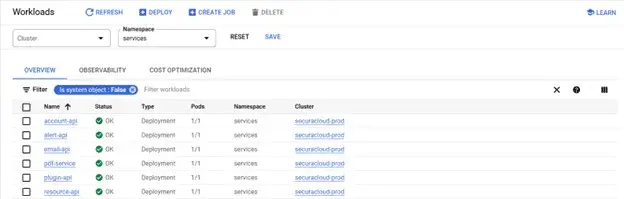
  • The application was deployed on Google Kubernetes Engine (GKE) for scalability, reliability, and cloud-native advantages.
  • Configured two GKE clusters to support distinct environments:
    • Development Environment: For development and optimization.
    • UAT: For testing and validation.
    • Production Environment: For live application deployment.

Automated CI/CD Pipeline in Azure DevOps Google Cloud Integration

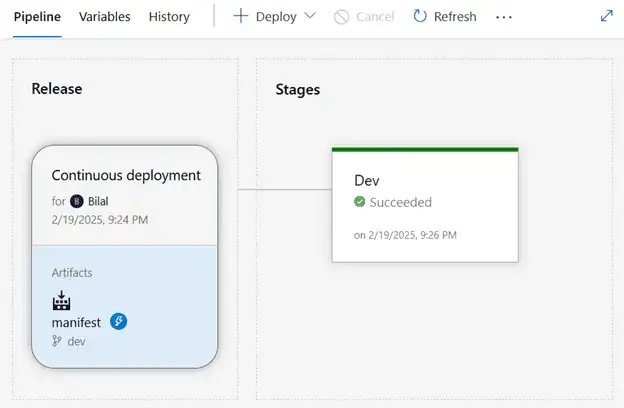
A CI/CD pipeline was designed with the following stages:
  • Build: The pipeline compiled and tested the code.
  • Release Creation: A version of release was generated and deployed to the development cluster for validation.
  • Release Promotion: Validated releases were promoted to the production cluster under the supervision of a release manager.
AI-Driven Enterprise Chatbot Implementation

Resource Optimization in Azure DevOps Google Cloud Integration

GCP’s auto-scaling features and cost management tools were leveraged to minimize unused resources, ensuring optimal cloud usage.

Automated Backups for Azure DevOps Google Cloud Integration

Implemented a scheduled backup mechanism using GCP’s snapshot and storage services to guarantee data availability and recovery capabilities.

Enhanced Server Management in Azure DevOps Google Cloud Integration

Utilized Infrastructure as Code (IaC) tools like Terraform to automate the provisioning and configuration of infrastructure.

Cloud Resources & Tools for Azure DevOps Google Cloud Integration

  • GKE: Google Managed Kubernetes service for containerized application.
  • Cloud Load Balancing: can balance HTTP and HTTPS traffic across multiple backend instances, across multiple regions.
  • Artifacts Registry: A universal package manager for all your build artifacts and dependencies. Fast, scalable, reliable and secure.
  • Cloud Storage: Cloud Storage is a managed service for storing unstructured data. Store any amount of data and retrieve it as often as you like.
  • Security Command Centre: The industry’s first multi-cloud security solution with virtual red teaming and built-in response capabilities—supercharged by Mandiant expertise and Gemini AI at Google scale.
  • Cloud Monitoring: Gain visibility into the performance, availability, and health of your applications and infrastructure.
  • Cost Management: For monitoring, controlling, and optimizing your costs.

Step-by-Step Implementation Approach for Azure DevOps Google Cloud Integration

Creating an Azure DevOps Project
AI-Driven Enterprise Chatbot Implementation
Centralized project organization for all resources (repositories, pipelines, artifacts, boards).
AI-Driven Enterprise Chatbot Implementation

Connecting Azure Pipelines to Google Artifacts Registry

  • Service Account Setup: Secure authentication for Azure Pipelines to interact with GKE cluster and Artifacts Registry.
  • Service Connection Creation: Established integration for pushing docker images to GCR.

Configuring Kubernetes Deployment

  • Defined YAML files for deployment configurations (e.g., replicas, resource limits, container images).
  • Set up separate environments for controlled and incremental deployment.

Automated CI/CD Pipeline Execution

  • Continuous Integration: Automated building and testing of code on commit.
  • Continuous Deployment: Automated rollout to development and production environments.

Monitoring and Feedback Loops

  • Integrated GCP Operations Suite for real-time performance monitoring and logging.
  • Implemented feedback loops to refine pipelines and application performance.

Enhanced Security Practices

  • Leveraged GCP Security Command Center for vulnerability scanning.
  • Applied IAM role-based access control to enforce least-privilege principles.

Overall Architecture of Azure DevOps Google Cloud Integration

AI-Driven Enterprise Chatbot Implementation

Azure DevOps Google Cloud Integration Use Case

  • Code Commit: Developer pushes code to Azure Repos.
  • Build Pipeline: Azure DevOps triggers a build process, including testing and packaging.
  • Google Container Registry: Works as a local registry from Google.
  • Deployment Pipeline: Azure DevOps manages staged rollouts to various environments in Google Cloud.
  • Monitoring: Monitor performance and gather logs using Google Cloud tools

Key Takeaways from Azure DevOps Google Cloud Integration

The successful migration of the Azure DevOps led to several valuable insights:
  • Automated Build and Deployment: Automated processes for efficiency, consistency, and faster releases across all environments.
  • Seamless Integration Across Platforms: Supported hybrid workflows and cross-platform CI/CD pipelines for multi-cloud environments.
  • Enhanced Code Quality: Improved quality with automated testing, static code analysis, and security checks during pipelines.
  • Faster Time to Market: Enabled rapid feature deployment and simplified rollbacks for efficient updates.
  • Improved Collaboration: Promoted teamwork between development, operations, and QA with version control and tracking.
  • Cost Efficiency: Optimized resources with Google Cloud’s pay-as-you-go model and minimized downtime costs.
  • Cost Governance: Implemented automated budget alerts and anomaly detection for better cost control.
  • Security and Compliance: Ensured compliance with automated checks, policy enforcement, and audit trails. Compliance with regulations like GDPR and SOC 2.
  • Continuous Monitoring and Feedback: Integrated telemetry for real-time insights and used feedback loops to refine applications and pipelines.

Final Words – Why We Are the Best Google Cloud Integration Company in the USA

The integration of Azure DevOps with Google Cloud Platform has proven to be a robust solution for organizations transitioning to the cloud. Through automated CI/CD pipelines, optimized resource management, and enhanced security practices, the migration addressed key pain points such as manual inefficiencies, cost overruns, and complex server management.
The automated build and deployment process significantly reduced development cycle times while ensuring seamless cross-platform compatibility. Additionally, real-time monitoring and security governance provided enhanced visibility, compliance, and operational control. As enterprises continue to adopt hybrid and multi-cloud environments, the combination of Azure DevOps and GCP presents a scalable, agile, and cost-effective approach to modern software delivery.
Royal Cyber’s cloud and DevOps experts ensure each integration is designed to meet unique business needs, delivering a secure, optimized, and future-ready solution.
To explore how Royal Cyber can help you implement Azure DevOps Google Cloud integration effectively, contact our team for a consultation. We’ll work with you to streamline deployments, improve efficiency, and achieve your DevOps transformation goals.

Author

Zeeshan Mukhtar
Talk With Our Expert

    [recaptcha]

    Recent Blogs
    Optimizely AI Experimentation

    Websites used to be something you built once and basically…

    Read More »
    Generative AI for APIs

    Using Generative AI for API Design in Google Apigee API…

    Read More »
    AI agent platforms

    Agentforce and Microsoft Copilot Studio are the two dominant enterprise…

    Read More »