Accessing Optimizely Configured Commerce API Using Postman

Postman API integration
Accessing Optimizely Configured Commerce API Using Postman
Saurabh Vilas Mayekar
Saurabh Mayekar
Solution Architect - Optimizely

June 17, 2025

AI-Driven Enterprise Chatbot Implementation

Introduction

In the world of digital commerce, agility and integration are everything. Whether you’re syncing product data with a CRM, building real-time order pipelines with ERP systems, or testing custom workflows, Optimizely Configured Commerce (OCC) provides a powerful set of REST APIs to extend your commerce experience. And what’s the easiest way to work with those APIs? Postman.

With its friendly interface, Postman makes it easy for users to log in, experiment with, and work out any trouble related to APIs. Those of you using OCC, along with those in development or integration roles, may find that using Postman reduces the length of your implementation.

In this guide, we’ll walk you through:
  • Generating your Client ID and Secret
  • Retrieving an access token
  • Making authenticated API requests
  • Exploring real-world use cases
  • Tips to troubleshoot common errors
Let’s dive in.
Discover Our Optimizely Solutions Today!

Why Postman for Optimizely API Access?

Before we jump into the how, let’s talk about the why. Optimizely’s Configured Commerce platform supports a rich RESTful API suite designed for composability and integration. But accessing those APIs securely and efficiently is crucial. That’s where Postman becomes your best friend — allowing you to:
  • Simulate full integration flows without writing a single line of code
  • Validate payloads and headers during API development
  • Troubleshoot production issues in a sandboxed environment
  • Collaborate seamlessly using shared collections
Whether you’re building a proof-of-concept or conducting regression testing for a new release, Postman is a must-have tool in your Optimizely toolkit.

Prerequisites

Before you start, ensure you have the following:
  • Access to the Optimizely Configured Commerce Admin Console
  • Access to PostmanDownload it here
  • Ability to create a SSO Client Application within the admin portal

Step 1: Generate Your Client ID and Secret

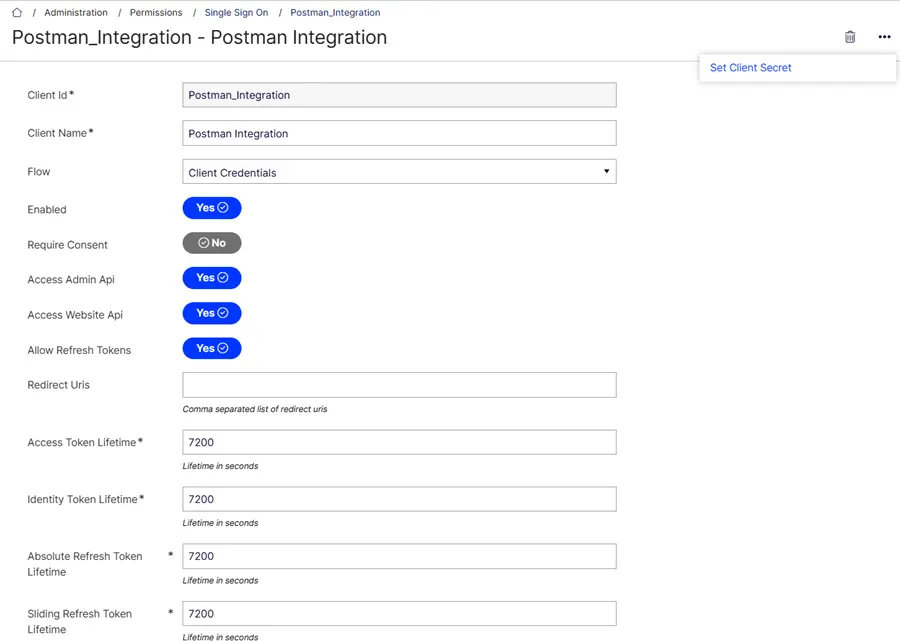
To begin, we need credentials to authenticate API access. These are created via the Single Sign On (SSO) section in the admin console.
Navigate to:
Administration → Permissions → Single Sign On Steps:
  1. Click Add Client.
  2. Set Client Id (a unique identifier).
  3. Name your client – for example, “Postman Integration”.
  4. Choose Client Credentials under Flow.
  5. Set Enabled to “Yes”.
  6. Set Require Consent to “No”.
  7. Enable Access Admin API and Access Website API.
  8. Enable Allow Refresh Tokens.
  9. Set Token Lifetime fields to 7200 (2 hours).
  10. Click Save.
  11. Under More Options, click Set Client Secret.
Important: The client secret is shown only once. Copy and store it securely — you’ll need it for the next step.
AI-Driven Enterprise Chatbot Implementation

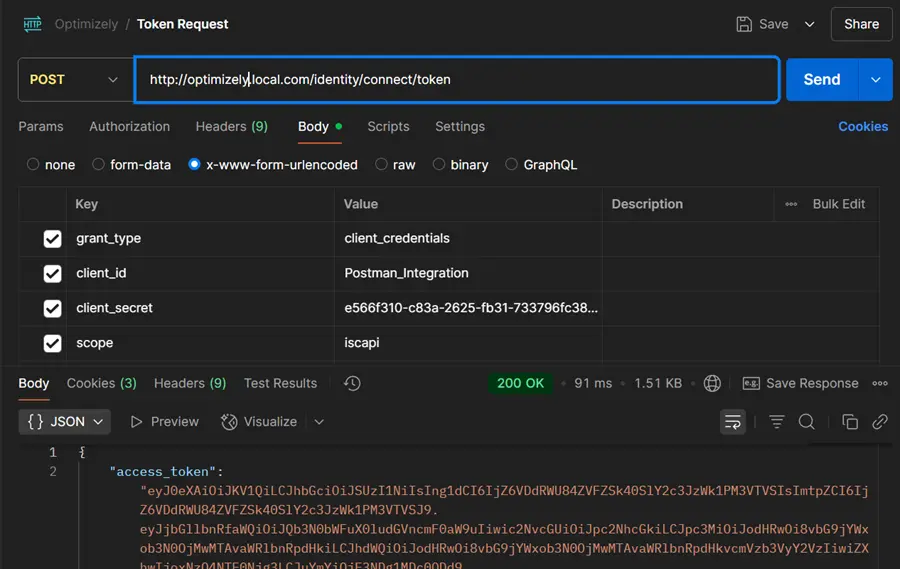
Step 2: Retrieve Your Access Token via Postman

Now that you’ve got your credentials, it’s time to authenticate.
Request Type:
POST https://<your-domain>/identity/connect/token
Body (x-www-form-urlencoded):
				
					
grant_type: client_credentials
client_id: your_client_id
client_secret: your_client_secret
scope: iscapi
				
			
Sample Response:
				
					{
"access_token": "eyJ...abc",
"expires_in": 3600,
"token_type": "Bearer"
}
				
			
Great! You’re now ready to make API calls.
AI-Driven Enterprise Chatbot Implementation

Step 3: Make Authenticated API Requests

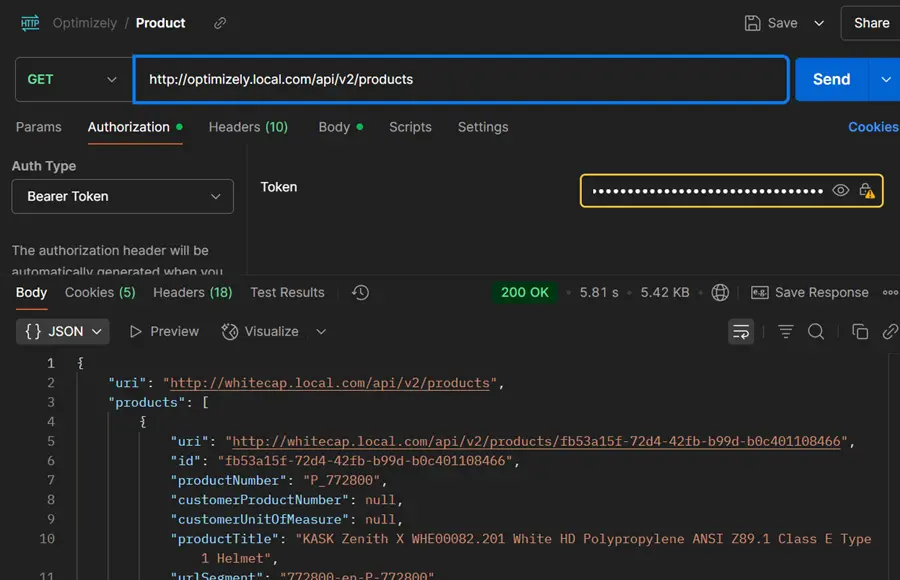
With your access_token, you can now query the API.
				
					GET
https://<your-domain>/api/v1/products 
Headers:
Authorization: Bearer <access_token> 
Content-Type: application/json
				
			
Success! You should receive a JSON list of products. You can now explore additional endpoints like /customers, /orders, /inventory, and more — all powered by the same access flow.
AI-Driven Enterprise Chatbot Implementation

Real-World Use Cases

Wondering how this applies in a practical setting? Here are some common scenarios where Postman + Optimizely API becomes a game-changer:
  1. Seamless Integration with External Systems
Push and pull data between OCC and your ERP, CRM, PIM, or marketing platforms — all via API — ensuring data consistency across your tech stack.
  1. Troubleshooting & Validation
Got a system bug? Reproduce it manually in Postman to isolate the issue — no need to guess what’s going wrong.
  1. Simulating End-to-End Flows
Test your API endpoints under real-world conditions before deploying changes to production.
  1. Onboarding Made Easy
Share a ready-to-use Postman collection with your dev team or third-party vendors to align everyone quickly and consistently.
  1. Quick Exploration without a Dev Environment
No local instance? No problem. Use Postman to interact with the live environment safely.
  1. Load Testing & Batch Operations
Use Postman’s Collection Runner to perform bulk operations or simulate concurrent API requests.

Troubleshooting Tips

API calls not going through? Here’s what to check:
  • 401 Unauthorized: Token is expired or missing. Re-authenticate and ensure Authorization header is set.
  • 403 Forbidden: Check if scopes and access permissions are properly configured in the SSO client.
  • Invalid Scope: Make sure you’ve added iscapi as the correct scope.
  • 500 Server Error: Validate the endpoint URL, request body format, and headers.
Still stuck? That’s where Royal Cyber can help.

Unlock the Full Potential of Optimizely with Royal Cyber

At Royal Cyber, we specialize in helping businesses get the most out of the Optimizely ecosystem — from API integrations and commerce implementations to custom development and performance optimization.
Our experts can:
  • Set up and secure your API environments
  • Build scalable, headless commerce solutions
  • Implement real-time integrations with third-party platforms
  • Accelerate go-live timelines with automation and pre-built connectors
  • Provide Postman collections and best practices for your teams
Whether you’re starting a new Optimizely project or enhancing an existing one, we’re here to guide you every step of the way.
Let’s Connect
Need help accessing your APIs or building a custom integration? Looking for a trusted Optimizely partner to elevate your commerce experience?

Author

Poonam Chandersy
Talk To Our Experts

    [recaptcha]

    Recent Blogs
    Optimizely AI Experimentation

    Websites used to be something you built once and basically…

    Read More »
    Generative AI for APIs

    Using Generative AI for API Design in Google Apigee API…

    Read More »
    AI agent platforms

    Agentforce and Microsoft Copilot Studio are the two dominant enterprise…

    Read More »