Home > Blogs > Salesforce > Simplifying Digital Asset Management with Bynder & Salesforce B2C Commerce
Simplifying Digital Asset Management with Bynder & Salesforce B2C Commerce
Lala Asif Allana
Director of Technology - Salesforce
July 7, 2025
Table of Contents
In the modern experience-driven digital economy, eCommerce brands are under unstoppable pressure to produce high-quality, consistent, and visually rich product content on all channels. Whether it is high-fidelity product rendering or exciting videos and educational papers, the requirement to scale digital assets management has never been more pressing.
Royal Cyber presents an effective solution to this challenge, and that is the integration of one of the most popular Digital Asset Management (DAM) platforms, Bynder, and Salesforce B2C Commerce. Integration makes the digital asset management easy, streamlines content processes, and overall digital shopping experience.
Discover Our Salesforce Solutions Today!
Why Integrate Bynder with Salesforce B2C Commerce?
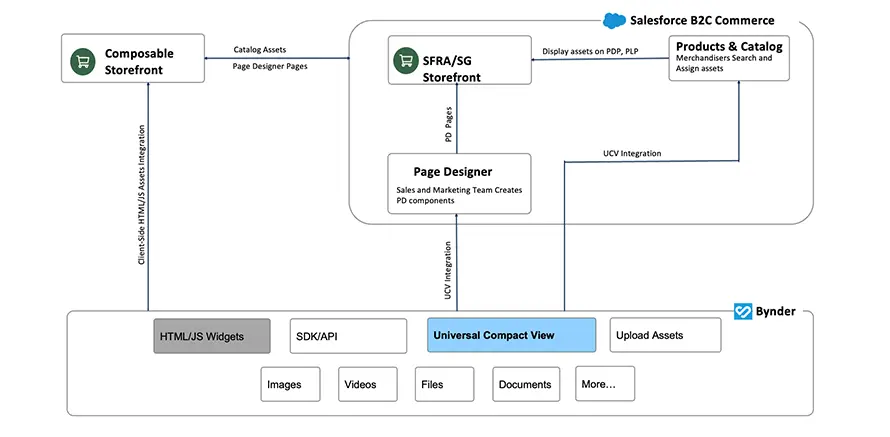
Managing thousands of assets — including product images, marketing videos, and technical documents — across fragmented systems often leads to version control issues, inconsistent branding, and time-consuming manual processes. The Bynder- Salesforce B2C Commerce integration solves these challenges by centralizing asset access and ensuring seamless content delivery across your storefront.
Key Benefits
- For all Salesforce B2C Commerce Frameworks: This cartridge is being developed for Salesforce B2C Commerce SiteGenesis, SFRA and Composable commerce frameworks.
- Centralized Asset Repository: All assets — images, videos, PDFs — are stored and managed in Bynder, reducing redundancy and manual updates.
- Real-Time Synchronization: Automated syncing ensures your eCommerce storefront always displays the most current visuals.
- Enhanced Customer Experience: Visually enriched product pages boost engagement, increase conversions, and reduce bounce rates.
- Reduced Operational Overhead: Custom tools and scheduled jobs automate tasks like syncing and asset assignment, saving valuable time for merchandisers and marketers.
Inside the Integration: How It Works
Our Bynder-Salesforce B2C Commerce integration Cartridge is built to be scalable, configurable, and user-friendly, empowering teams to manage assets directly from within Salesforce B2C Commerce.
Backend Asset Sync and Storage
At the heart of the integration lies an automated sync between Bynder and Salesforce B2C Commerce:
- Custom scripts periodically fetch asset metadata from Bynder via its secure API.
- Metadata, such as file type (image, video, document), format, and URL, is stored in Salesforce B2C Commerce as custom product attributes or within dedicated custom objects.
This process ensures product media content is always accurate and up-to-date.
Frontend Rendering via PWA Kit
The Salesforce B2C Commerce PWA Kit is leveraged to create modern, responsive, and high-performance storefronts. Custom React components are designed to render Bynder assets dynamically:
- BynderImageGallery displays product images in carousels.
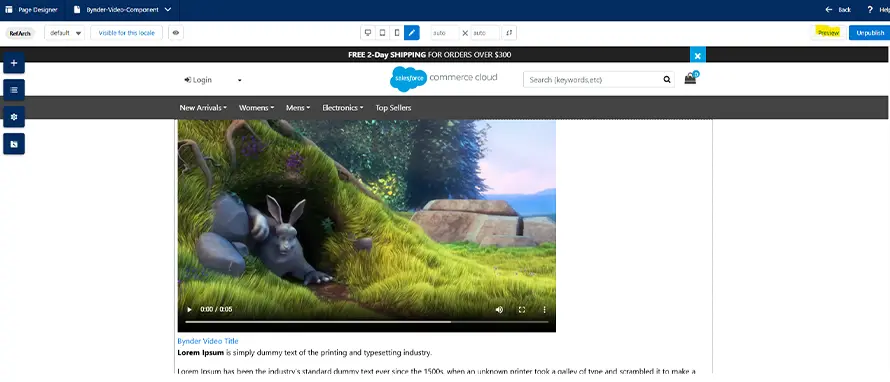
- BynderVideoPlayer embeds videos directly on product detail pages (PDPs).
- BynderDocumentsAccordion presents downloadable files in an elegant, collapsible UI.
Assets are displayed based on real-time site preferences and environment variables — giving admins full control over visibility, layout, and presentation.
Business Manager Experience: Seamless Asset Assignment
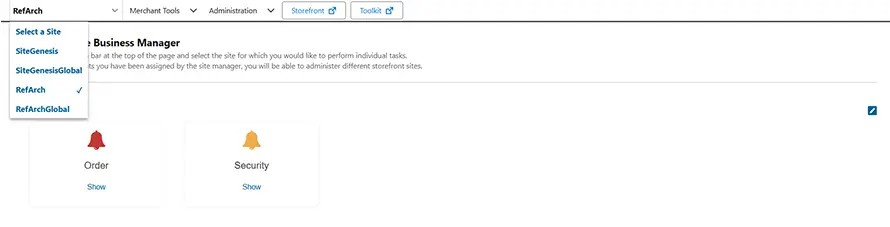
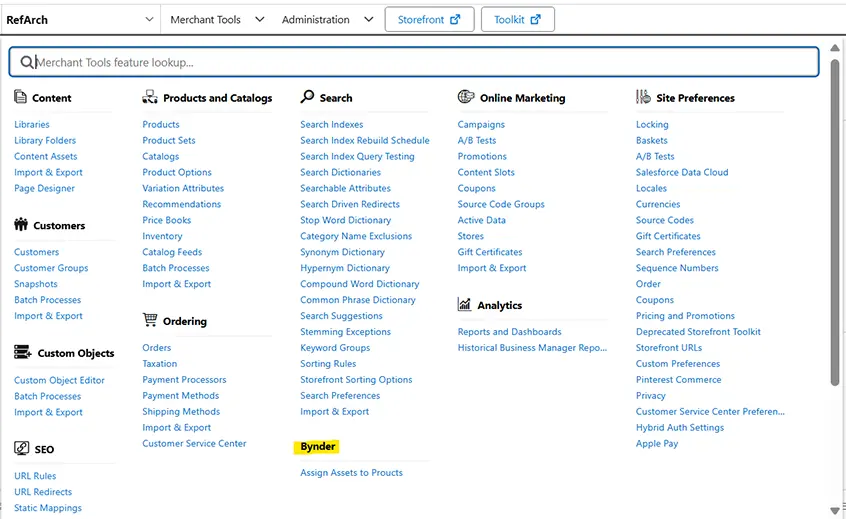
The integration offers a robust interface within Salesforce Business Manager, giving merchandisers full control over asset assignment without leaving the platform.
Business Manager Capabilities:
- Enable or disable Bynder integration at the site level.
- Manage rendering templates for images, videos, and files.
- Assign or unassign assets (images/videos/documents) to products or categories.
- Configure full catalog or delta sync jobs to keep product assets aligned.
- Preview and manage assigned assets directly within the Business Manager interface.
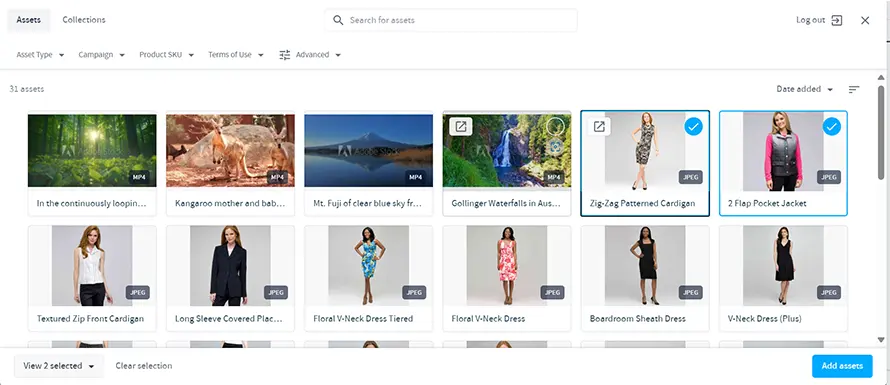
All asset selections are made through Bynder’s Universal Compact View — a sleek, user-friendly widget that allows users to search, preview, and assign media in just a few clicks.
Dynamic Page Design with Bynder
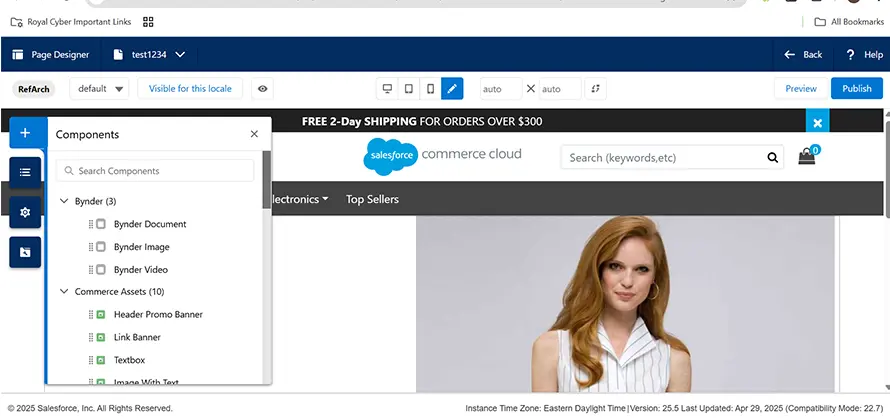
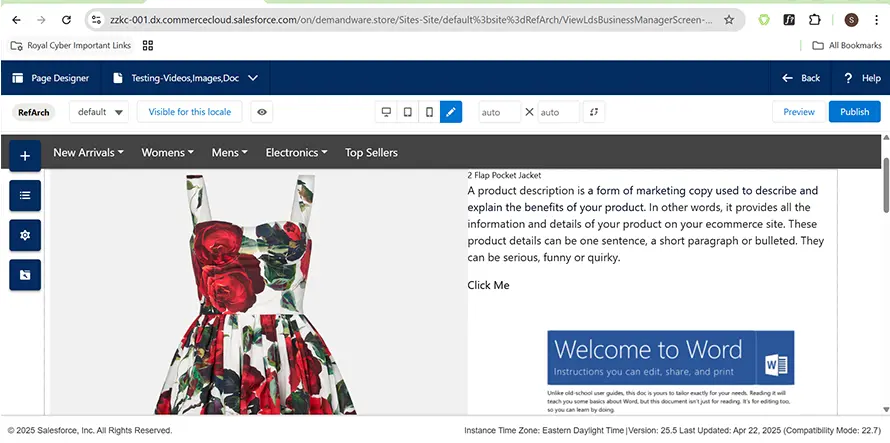
Going beyond product pages, the integration empowers content creators to design full storefront pages using Bynder assets within the Page Designer tool. Marketers and merchandisers can:
- Drag and drop Bynder Image, Video, or Document components into any storefront layout.
- Search for and assign assets using Bynder’s Universal Compact View.
- Preview, resize, annotate, and publish pages without switching platforms.
This functionality dramatically speeds up content creation and ensures consistent branding across the customer journey.
PWA Kit Integration Guide: A Developer’s Dream
Whether you’re running locally or deploying via Salesforce Managed Runtime (MRT), our integration ensures a seamless developer experience:
- Configure the environment via .env with all required API credentials and preferences.
- Render media dynamically by checking values such as bynderEnabled, bynderShowVideosOnPdp, and more.
- Manage assets via REST/GraphQL — fetching and displaying media URLs stored in product attributes like c_bynderAsset.
The integration supports full deployment to Salesforce MRT, enabling enterprise-grade scalability and performance.
Real-World Impact: Client Success Story
A leading global retail brand recently partnered with Royal Cyber to implement the Bynder- Salesforce B2C Commerce integration. The results were transformative:
- 70% reduction in manual effort for managing digital assets.
- Faster page loads thanks to centralized media delivery and optimized rendering.
- Improved conversion rates, attributed to a richer and more consistent visual product experience.
With centralized control and intelligent automation, their content teams now focus on creativity rather than administrative overhead.
Limitations & Considerations
While the integration is powerful, it’s important to understand the current limitations:
- Assets flow only from Bynder to Salesforce B2C Commerce— not the other way around.
- The solution does not update or upload assets from Salesforce B2C Commerce to Bynder.
- Site admins must pre-configure settings such as token authentication, collection filters, and UI preferences.
Royal Cyber offers end-to-end support for setup, testing, and ongoing maintenance to ensure your team is set up for success.
The Road Ahead
Our vision doesn’t stop here. Royal Cyber is actively working to extend this integration with:
- Advanced AI tagging for media assets.
- Real-time analytics on asset performance.
- Enhanced personalization using Bynder metadata in Einstein recommendations.
Let’s Transform Your Digital Commerce Experience Together!
Whether you are looking to streamline your business operations, improve brand consistency, or delight customers with immersive media, Royal Cyber’s Bynder-Salesforce B2C Commerce integration is a best-in-class solution.

Our certified Salesforce experts are ready to help you implement and tailor the integration to your unique business needs. Reach out to us today to explore how Royal Cyber can help elevate your digital asset strategy.
Author
Poonam Chandersy
Talk To Our Experts
Recent Blogs
Agentforce and Microsoft Copilot Studio are the two dominant enterprise…
Read More »Websites used to be something you built once and basically…
Read More »