
Home > Blogs > Salesforce > 7 Steps to Build AI Agents with Salesforce Agentforce
February 23, 2026
7 Steps to Build AI Agents with Salesforce Agentforce
Table of Contents
The integration of Artificial Intelligence (AI) agents is transforming enterprise Customer Relationship Management (CRM), progressing from basic chatbots to self-sufficient systems. These smart agents are changing the way companies engage with clients and optimize internal processes. Royal Cyber understand this shift, and with Salesforce’s Agentforce, companies can implement advanced AI agents that boost efficiency and improve customer experiences. Salesforce Agentforce is a sophisticated AI agent platform that utilizes large language models (LLMs) to independently execute intricate, multi-step tasks within the Salesforce environment. In contrast to conventional bots that operate on set rules, Agentforce agents leverage generative AI to understand context, analyze, and perform tasks across diverse business functions, transforming data into actionable insights for ongoing enhancement. This guide presents a 7-step approach for effectively deploying AI agents using Salesforce Agentforce, leading to measurable business outcomes.
Discover What’s New in ServiceNow
Step 1: Define Your AI Agent's Business Objectives
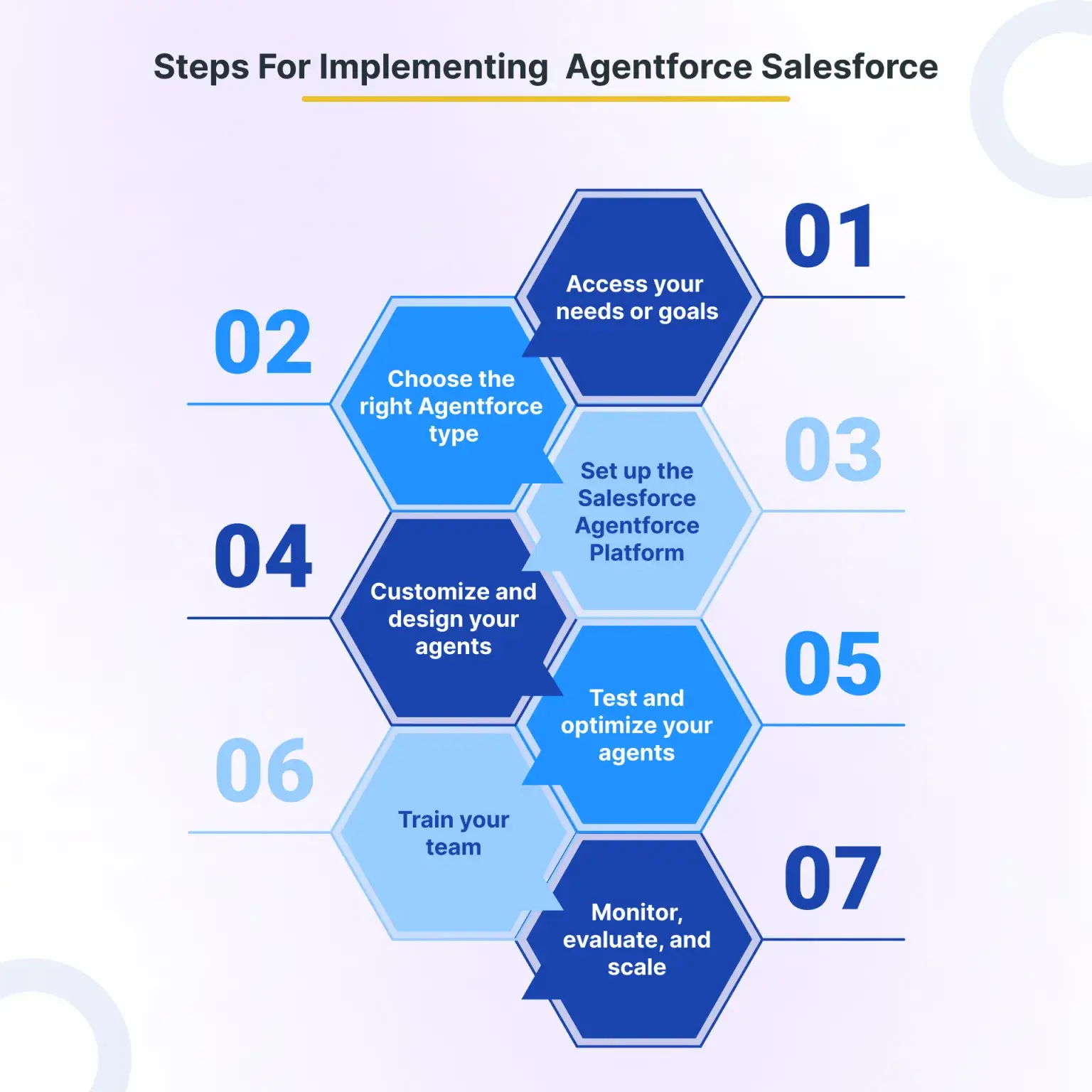
The first step for effectively deploying an AI agent is to clearly establish its business goals. Identify specific, high-impact business processes suitable for automation where an AI agent can provide substantial benefits. These commonly encompass fields such as customer support (e.g., automating standard questions), sales (e.g., qualifying leads), or operations (e.g., purchasing functions). Match agent abilities with quantifiable Key Performance Indicators (KPIs) and expected Return on Investment (ROI). For example, a customer service AI agent could seek to decrease case handling time by 40% or boost first-call resolution rates by 60% autonomously. Essentially, establish scope limits and triggers for human handoff to guarantee a smooth experience. Aligning stakeholders on success criteria prior to the start of development is essential.
The first step for effectively deploying an AI agent is to clearly establish its business goals. Identify specific, high-impact business processes suitable for automation where an AI agent can provide substantial benefits. These commonly encompass fields such as customer support (e.g., automating standard questions), sales (e.g., qualifying leads), or operations (e.g., purchasing functions). Match agent abilities with quantifiable Key Performance Indicators (KPIs) and expected Return on Investment (ROI). For example, a customer service AI agent could seek to decrease case handling time by 40% or boost first-call resolution rates by 60% autonomously. Essentially, establish scope limits and triggers for human handoff to guarantee a smooth experience. Aligning stakeholders on success criteria prior to the start of development is essential.
- Identify high-impact business processes for automation.
- Map agent capabilities to measurable KPIs and ROI metrics.
- Define clear scope boundaries and human handoff triggers.
- Align stakeholders on success criteria before development.
Step 2: Configure Your Agentforce Environment
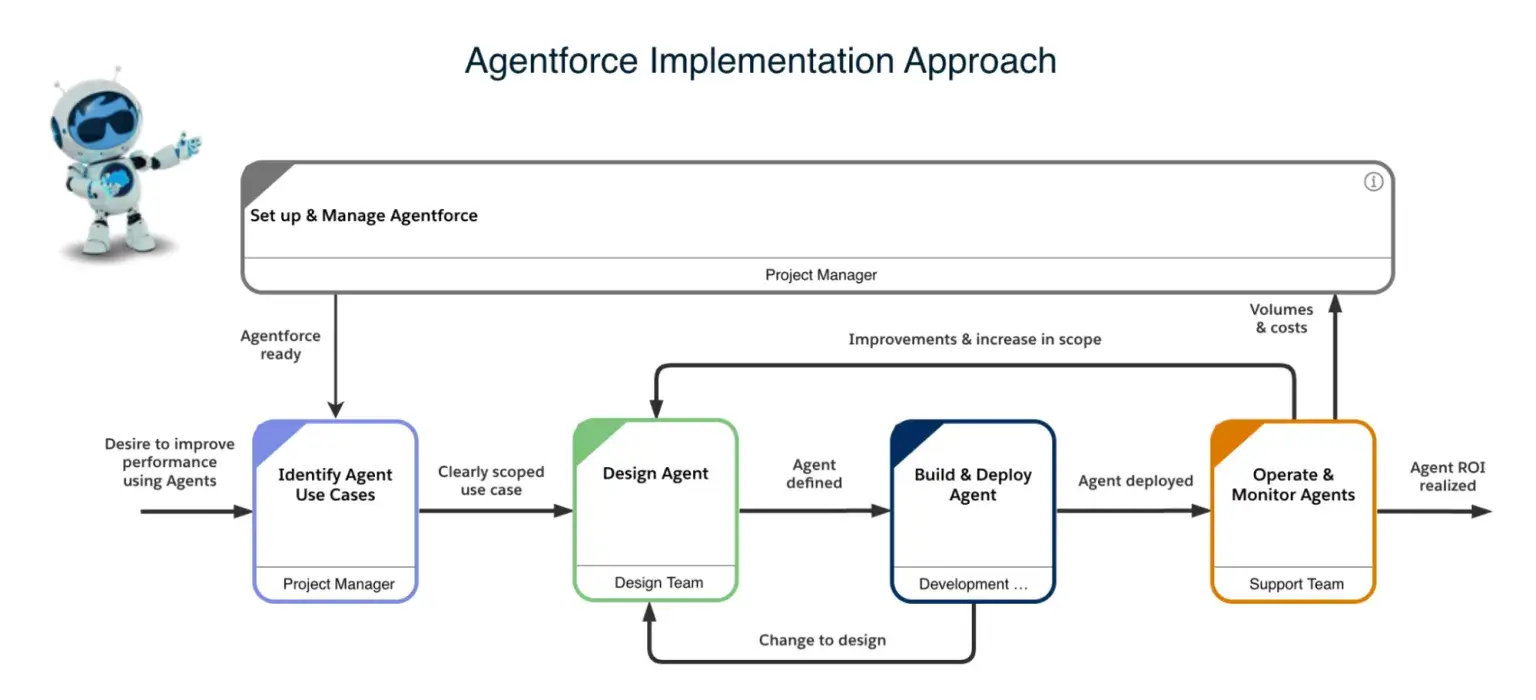
Configuring your Salesforce Agentforce environment correctly is foundational for agent performance and security. This involves setting up Agentforce within your existing Salesforce org architecture, ensuring all necessary permissions, data access, and security protocols are in place. Agents inherit user permissions, so auditing your security model before deployment is critical to prevent unintended data exposure. Integrate all required data sources and external systems, leveraging Salesforce Data Cloud for a unified customer view. A strong data foundation is crucial, as 96% of IT leaders agree that AI agent success depends on seamless data integration across systems. Establish a sandbox environment for thorough testing and iteration, minimizing risks during deployment.
Salesforce Agentforce vs Traditional Automation Approaches
Self-Service Empowerment
This comparison helps organizations understand when to choose AI agents over traditional automation methods, highlighting the unique capabilities and ideal use cases for Agentforce versus Einstein Bots, Flow Builder, and Process Builder.
| Automation Approach | Best Use Cases | Complexity Level | Learning Capability | Implementation Time |
| Salesforce Agentforce | Complex, multi-step autonomous tasks; real-time contextual interactions across sales, service, marketing | High | Continuous learning via LLMs, generative AI, Atlas Reasoning Engine | 4-12 weeks (pilot to scale) |
| Einstein Bots | Rule-based FAQ automation; basic self-service; simple customer inquiries | Moderate | Limited, predefined NLM training | Weeks to months (manual NLM training can be intensive) |
| Flow Builder | Automated workflows; guided screen flows; record-triggered actions; approval processes | Low to Moderate | None (logic is explicitly defined) | Days to weeks |
| Process Builder | Automated processes based on record changes or platform events (being phased out) | Low | None (logic is explicitly defined) | Days |
| Third-Party AI Platforms | Specialized AI tasks (e.g., advanced sentiment analysis, niche lead generation) | Varies (often high) | Varies (can be advanced ML) | Months (integration complexity varies) |
Step 3: Develop Logical and Conversational Workflows
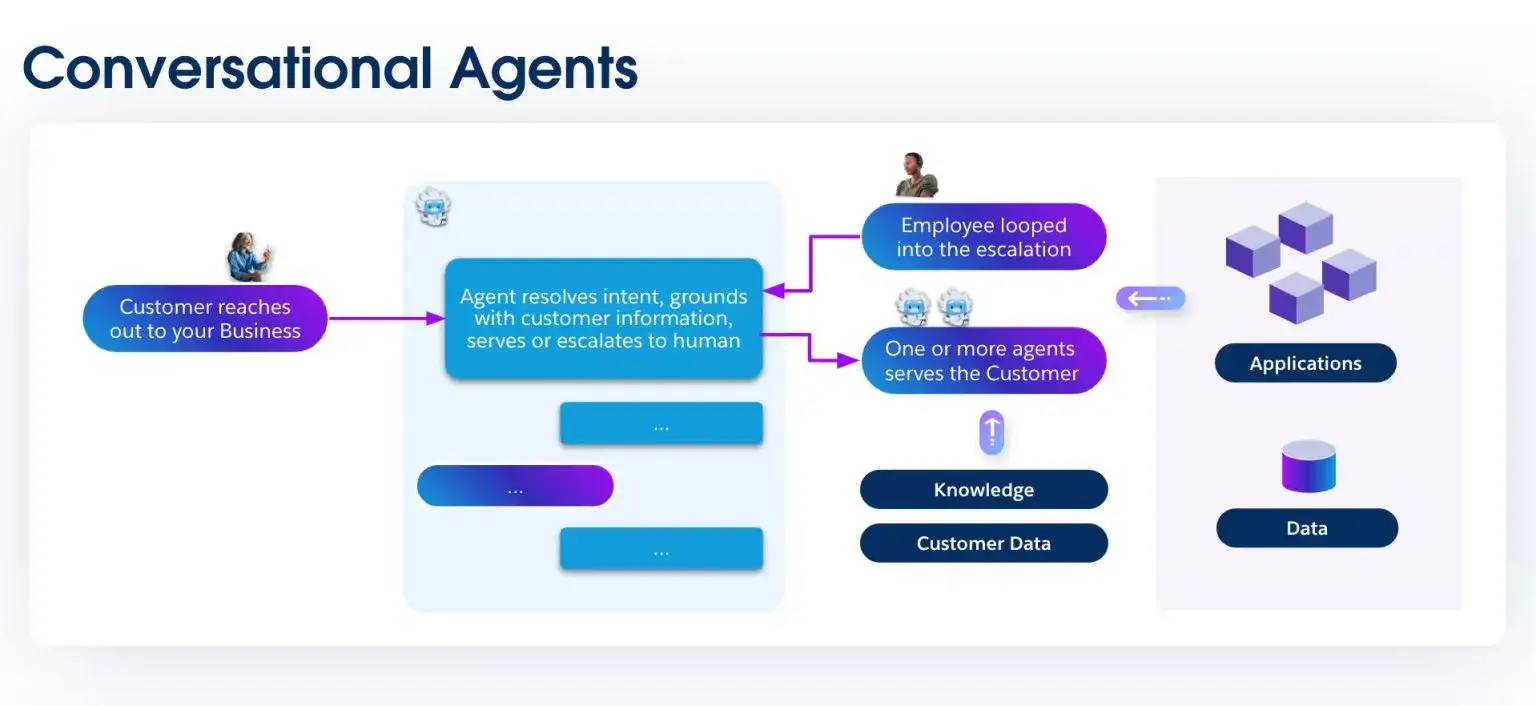
Efficient AI agents need thoughtfully designed communication methods and robust reasoning. Develop a diagram outlining all customer journey touchpoints for agent engagement, considering both proactive and reactive interactions. To guarantee that agents can address diverse user intents and provide accurate information, develop decision trees and conditional logic to guide their replies. Establish explicit escalation pathways to human representatives, along with alternative solutions for situations that surpass the AI’s existing abilities. This ensures a perfect client experience even if the agent encounters an unusual situation. Importantly, establish natural language understanding (NLU) frameworks to accurately interpret customer questions enabling the agent to reply swiftly and precisely
Step 4: Train Your AI Agent with Domain Knowledge
Equipping your AI agent with relevant domain knowledge is crucial for its efficiency. Provide the agent with company-related data, policies, and procedures, making sure it has access to reliable and current information. Implement knowledge base integration to provide comprehensive and consistent responses. Configure machine learning models using historical interaction data to improve the agent’s understanding and response accuracy. Salesforce’s Data Cloud and Agentforce’s Atlas Reasoning Engine are critical for real-time data retrieval and contextual understanding. Test the agent’s understanding across diverse query scenarios, including “real-world noise” like accents or contradictions, to ensure robustness.
Step 5: Implement Multi-Channel Deployment
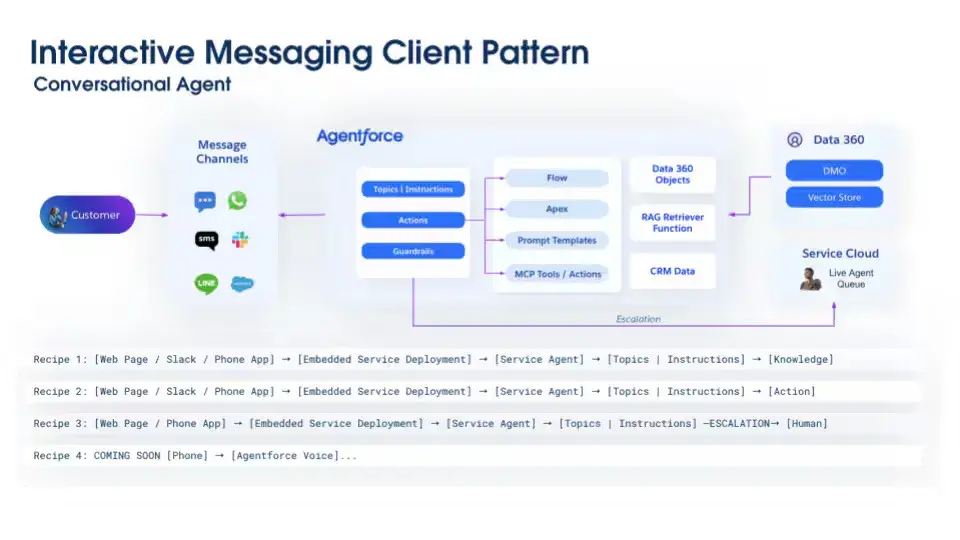
Distributing your AI agent across various channels ensures that customers remain engaged consistently, no matter the platform. To provide a unified experience, implement agent deployment across chat, messaging, email, and phone platforms. This involves making sure that the behavior and tone of agents stay uniform throughout all customer interactions. Set up response formats and adjustments specific to each channel, like offering detailed explanations for emails or keeping it brief for SMS. To ensure that consumer interactions remain seamless while transitioning between channels, assess cross-channel transfers and context preservation. In challenging tasks, multi-agent systems achieve 90% superior performance compared to single-agent configurations, highlighting the importance of coordination.
Step 6: Monitor Performance and Optimize Continuously
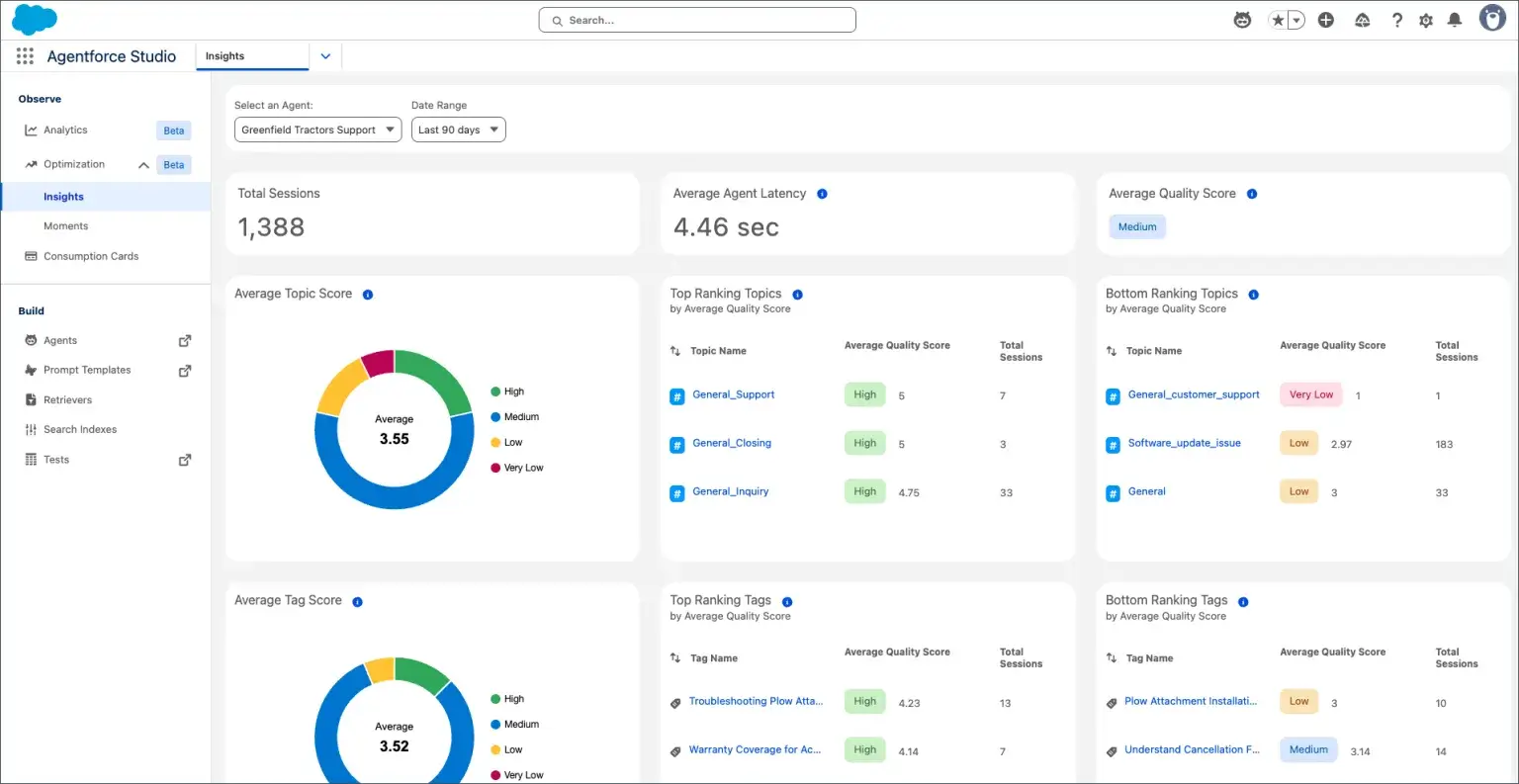
Ongoing assessment and enhancement are essential to ensure the greatest benefit from your AI bots. Develop live dashboards to track key metrics regarding agent performance, such as efficiency improvements, customer satisfaction scores (CSAT), and resolution rates. AI-driven CSAT can effectively evaluate sentiment and tone. Identify areas lacking knowledge and common failure trends to inform future training and enhancements. To identify the most effective strategies, perform A/B testing to assess variations in agent responses. This repetitive procedure guarantees that your AI agents are continually enhancing and adjusting to evolving client requirements.
Step 7: Scale and Expand Agent Capabilities
When your AI agents are functioning well, concentrate on increasing and enhancing their abilities. To manage complex tasks, slowly incorporate new use cases and expand agent responsibilities. For a truly comprehensive AI ecosystem, incorporate additional Salesforce clouds and external platforms. Utilize agent orchestration to allow multiple agents to collaborate on complex tasks within complex multi-agent workflows. Develop a plan for advanced functionalities, including predictive actions, enabling agents to anticipate client needs prior to them being explicitly stated. In the third quarter of fiscal 2026, Salesforce disclosed 18,500 total Agentforce agreements with 9,500 paid transactions, reflecting rapid adoption and growth potential
Key Takeaways
- Define clear business objectives and measurable KPIs before Agentforce implementation.
- Ensure robust data integration and security protocols within your Salesforce environment.
- Design intuitive conversational workflows with defined human handoffs.
- Train agents with comprehensive, domain-specific data for accurate responses.
- Deploy agents across multiple channels for consistent customer engagement.
- Continuously monitor agent performance and optimize through iterative feedback loops.
- Plan for incremental scaling and expansion of agent responsibilities.
Conclusion: Transforming Customer Engagement with Royal Cyber
The strategic implementation of AI agents with Salesforce Agentforce is no longer a luxury, but rather a requirement for businesses seeking to lead in customer engagement and operational efficiency. Organizations can use autonomous AI to revolutionize their CRM procedures and get a competitive edge by implementing these seven steps. For instance, Digital Infrastructure Singapore used Agentforce to reduce case processing time by 40% and speed up the quote-to-provisioning cycle by 25%. As a recognized expert in Salesforce AI installations, Royal Cyber provides clients with exceptional expertise to help navigate each step of this revolutionary process. Our strategic approach and in-depth knowledge of Salesforce Agentforce guarantee effective implementations that produce quantifiable business results. For organizations ready to deploy Agentforce and embrace the future of AI-driven customer engagement, partnering with Royal Cyber provides the strategic insight and technical proficiency needed to achieve a significant competitive advantage through early AI agent adoption.
FAQ
1. What is the difference between Einstein Bots and Salesforce Agentforce?
Large language models (LLMs) are used by Salesforce Agentforce, a sophisticated, independent AI agent platform, to understand context, reason, and do complex, multi-step activities on its own across many business areas. Compared to Agentforce, Einstein Bots (conventional bots) require more user involvement and have less autonomy in making decisions because they follow rules, focus on pre-written responses, and primarily handle simple customer service inquiries and basic FAQ automation.
2. What is the time required to establish an AI agent for Salesforce Agentforce?
The standard installation period for a Salesforce Agentforce AI agent ranges from four to twelve weeks, depending on the complexity of the use case, the business size, and integration requirements. Significant enterprise implementations requiring extensive governance and custom agents might take 1-3 months for pilot phases and several additional months for complete deployment, whereas smaller initiatives or those using ready-made agents can achieve deployment in as little as 12 days
3.What are the prerequisites for deploying AI agents in Salesforce?
Deploying AI agents in Salesforce requires several prerequisites, including a suitable Salesforce edition (typically Enterprise or Unlimited), a strong data foundation with unified and high-quality data (ideally via Data Cloud), and robust integration capabilities with external systems. Organizational readiness, including defined use cases, stakeholder alignment, and a team skilled in Agent Builder, prompts, and security protocols, is also crucial.
4.How much does Salesforce Agentforce cost compared to other AI solutions?
Salesforce Agentforce pricing involves a hybrid model, combining consumption-based Flex Credits ($0.10 per action) with seat-based licensing. Agentforce 1 Editions start at $550 per user per month (PUPM), bundling Flex Credits and Data Cloud. This can be more complex than standalone AI platforms but offers deep integration and ROI through efficiency gains and cost savings. Total cost of ownership should also account for base Salesforce editions, add-ons, API limits, and professional services.
Talk To Our Experts
Recent Blogs
Websites used to be something you built once and basically…
Read More »
July 21, 2026
Websites used to be something you built once and basically…
Read More »Websites used to be something you built once and basically…
Read More »