Enhancing React Applications with Embedded Power BI Reports Using a C# Backend

C# Power BI API
Enhancing React Applications with Embedded Power BI Reports Using a C# Backend
Siddharth Tayde
Siddharth Tayde
Software Engineer - Optimizely

June 24, 2025

Enhancing React Applications with Embedded Power BI Reports Using a C# Backend

Introduction

In today’s data-driven world, integrating powerful analytics into web applications is not just a luxury—it’s a necessity. Embedding Power BI reports into React applications provides users with interactive and insightful data visualizations directly within the app interface. Leveraging a C# backend ensures secure and efficient data handling, making the integration seamless and robust.

Architectural Overview

The integration follows a structured flow:
  1. React Frontend: Users interact with the frontend, which sends reportId and workspaceId to the backend.
  2. C# Backend API: Authenticates with Azure Active Directory (Azure AD) and retrieves the Embed URL and Access Token.
  3. Power BI Service: Returns the embedded details.
  4. React Frontend: Utilizes powerbi-client-react to embed the report.

Purpose and Benefits

  • Dynamic Embedding: Allows embedding various reports without hardcoding.
  • Security: Ensures secure access through Azure AD authentication and token management.
  • Modularity: Separates concerns between frontend and backend, promoting maintainability.
Discover Our Optimizely Solutions Today!

Backend Implementation Details

Power BI Settings Configuration

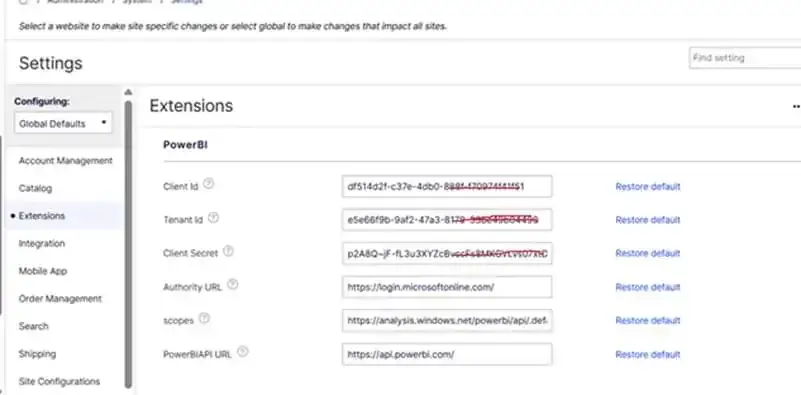
A custom PowerBISettings class manages essential authentication and report configuration values:
  • Client ID: Application (client) ID from Azure App Registration.
  • Client Secret: Secret key generated for the application.
  • Tenant ID: Azure Active Directory tenant ID.
  • Authority URL: Azure login endpoint (e.g., https://login.microsoftonline.com/).
  • Scopes: Permissions required (e.g., https://analysis.windows.net/powerbi/api/.default).
  • PowerBIAPI URL: Base URL to call Power BI APIs (e.g., https://api.powerbi.com/).
  • Report ID: The Power BI report ID to embed.
  • Workspace ID: The workspace ID containing the report.
AI-Driven Enterprise Chatbot Implementation

Power BI Web API Controller

The backend exposes an authenticated API endpoint to serve embed details securely to the React frontend. This endpoint receives report requests and returns the appropriate embedUrl, reportId, and accessToken.

Click Link To See Sample Code Snippet: PowerBIController

GetPowerBIReportResult Handler

This handler is responsible for:
  • Authenticating with Azure Active Directory using client credentials.
  • Utilizing Microsoft PowerBI API library.
  • Retrieving the specified Power BI report using reportId and workspaceId.
  • Generating an embedded token for the report.
  • Returning the embed URL and token to the frontend.
Click Link To See Sample Code Snippet: GetPowerBIReportResult Handler

Frontend Implementation Details

Installation Dependencies

To embed Power BI reports into your React frontend, install the required packages, especially the powerbi-client-react library:

Sample package.json Configuration


{
    "private": true,
    "dependencies": {
        "powerbi-client-react": "^2.0.0"
    }
}


Installation Instructions:

After updating the package.json file, run the following command in the terminal:
				
					
npm install


PowerBi Component

This React component is responsible for:
  • Requesting embed details from the backend using reportId and workspaceId.
  • Utilizing powerbi-client-react to embed the report using the received details.
  • Handling loading states and potential errors during embedding.
Click Link to See Sample Code Snippet: PowerBIComp

File Structure and Responsibilities

  1. Backend:
    • GetPowerBIReport.cs: Handles the logic for authenticating and retrieving embed details.
  2. Frontend:
    • PowerBIComp.tsx: React component responsible for embedding the Power BI report.
    • loadPowerBIReport.ts: Manages the API call to fetch embed details.
    • PowerBiIntegration.tsx: Widget that integrates the Power BI component into the application.
    • PowerBiService.ts: Defines the service for API interactions related to Power BI.

The Output

AI-Driven Enterprise Chatbot Implementation

Advantages and Considerations

Pros:

  • Security: Utilizes Azure AD for secure authentication and token generation.
  • Scalability: Modular design allows for easy scaling and maintenance.
  • User Experience: Provides seamless integration of reports within the application interface.

Cons:

  • Complexity: Requires understanding of both frontend and backend technologies, as well as Azure configurations.
  • Maintenance: Token management and error handling need to be robust to prevent issues.

Conclusion

Embedding Power BI reports into a React application using a C# backend is a robust and secure approach for delivering dynamic data visualizations. By clearly separating frontend and backend responsibilities, this method enhances scalability, maintainability, and security—especially by keeping sensitive tokens and authentication logic on the server side. While it’s possible to embed Power BI reports using the JavaScript embed script directly in the frontend, this alternative.

Author

Poonam Chandersy
Talk To Our Experts

    [recaptcha]

    Recent Blogs

    Agentforce and Microsoft Copilot Studio are the two dominant enterprise…

    Read More »
    copilot-azure-logic-apps-workflow-automation

    Websites used to be something you built once and basically…

    Read More »
    Websites used to be something you built once and basically…

    Read More »